The “Neglected Storefront” Tax: How outdated banners and unmanaged listings are quietly killing your online sales
Updated: 3 hours ago
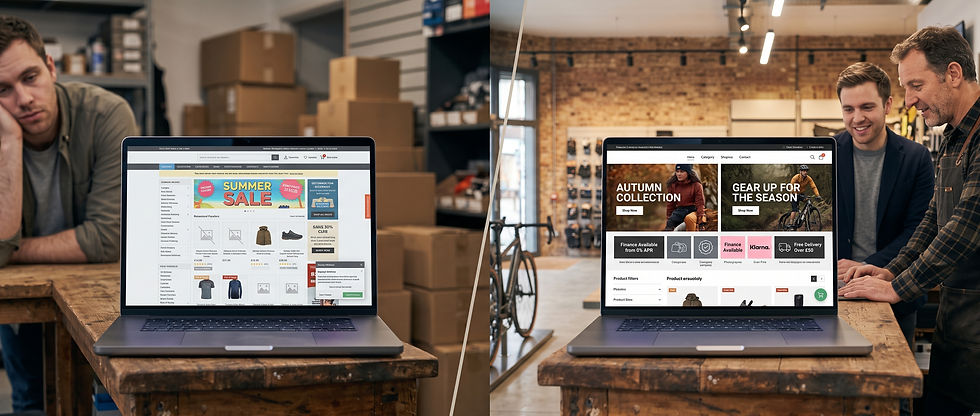
Imagine walking down your local high street in November. You pass an independent shop window. In the display, surrounded by dust, is a faded poster advertising a "Summer Bank Holiday Sale." Inside, Christmas stock has arrived, but it’s shoved into mismatched boxes at the back of the room while summer clearance items clutter the front entrance.
Would you walk in? Or would you keep walking toward a store that looks open, active, and organized?
Online, buyers make that decision in less than three seconds.
For busy retail owners running an independent shop, managing an e-commerce site on top of daily shop-floor operations, stock deliveries, and customer service is exhausting. The website often becomes the last priority.
But leaving your digital storefront untouched isn't just an visual issue—it’s costing you real money. Here is how the "Neglected Storefront Tax" bleeds your online revenue, and how proper digital merchandising across your homepage and product listings fixes it.
1. The Homepage: Your Digital Shop Window
Your homepage serves one primary purpose: to reassure the visitor that you are open for business, trading actively, and ready to fulfil their order.
When a customer lands on a homepage with broken seasonal banners, missing supplier logos, or last month’s promotion still running, doubt instantly sets in: Is this shop still trading? Will they actually ship my order if I buy today?
The Fix: Strategic Homepage Merchandising
Seasonal Campaign Swaps: Your main hero banner should change in line with seasonal shifts, weather turns, and key retail events. For example, a sports or bike shop should seamlessly transition from summer kit to autumn wet-weather gear, winter lighting, and early Christmas gifting.
Supplier Brand Spotlights: Feature top-tier brand logos and curated seasonal collections (e.g., New Season Drops from Shimano, Brooks, or Hoka) prominently on the homepage. Aligning your independent brand with trusted global suppliers builds instant credibility.
Current Promotional Hooks: Keep your promotional bars updated with active offers—whether that's free delivery thresholds, click-and-collect availability, or active finance/tax-free workplace schemes (like V12, Klarna, or Cycle-to-Work).
2. Product Listings & Collection Pages: The Digital Aisle
Merchandising doesn't stop at the homepage banner. Once a customer clicks through to a category page (e.g., Running Shoes, Gravel Bikes, or Cycling Clothing), poor listing management can derail the sale entirely.
On proprietary and EPOS-integrated systems (like Citrus-Lime, Shopify, or WooCommerce), product collections often default to sorting strictly by alphabetical order or stock arrival date. This creates a messy, uninspiring browse experience.
The Fix: Smart Collection & Product Level Merchandising
Lead with High-Margin & In-Stock Items: Pin your best-selling, highest-margin, and fully stocked products to the top two rows of your category grids. Never let out-of-stock items or obscure spare parts occupy prime visual real estate at the top of a category page.
Visual Consistency Across Thumbnails: Ensure product listing images follow a consistent visual standard. High-quality product shots on clean, uniform backgrounds make browsing effortless. Blurry supplier assets mixed with dark, hand-shot phone photos lower the perceived value of your store.
Strategic Badging & Visual Highlights: Use clear overlay badges on listing thumbnails to call out key purchasing triggers, such as "Best Seller," "In Stock - Same Day Dispatch," "20% Off," or "Finance Available." These micro-cues draw the eye and encourage clicks.
Fixing Multi-Variant Complexity: If a product comes in multiple sizes, colours, or technical specifications, ensure the listing thumbnail clearly reflects what’s actually available. Nothing frustrates an online buyer faster than clicking a product only to find their size has been out of stock for weeks.
3. The Solution: Hands-Off Storefront Management
The challenge for most independent retailers isn't a lack of vision - it’s a lack of time.
You shouldn't have to choose between serving customers on the shop floor and spending hours tweaking banners or reordering category grids in your website’s back office.
At Clixl, we handle the ongoing visual management, seasonal banner rollouts, and collection merchandising of your online store for you. We keep your site looking fresh, professional, and trading hard 365 days a year—without you ever having to touch the back office.
Is your online store suffering from the "Neglected Storefront Tax"?
Comments